
Transferring the RID Master, Infrastructure Master and PDC Emulator Role
Checking the Current Role Holders
You can learn about three domain-wide role holders, including their FQDNs, by running the following cmdlet:Get-ADDomain
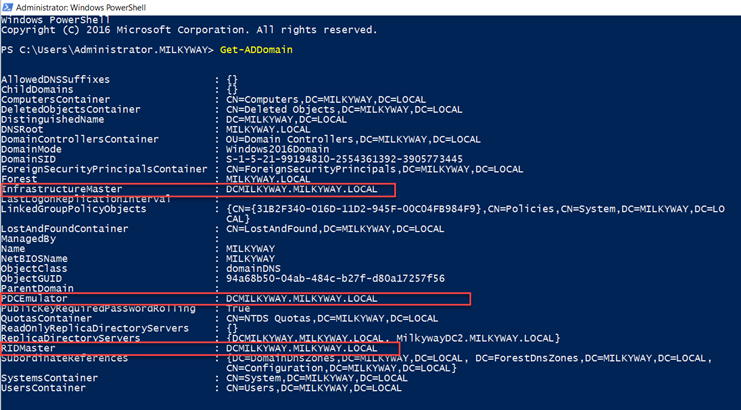
You can use the Get-ADDomain cmdlet again after transferring FSMO roles to make sure that the operation was successful.
Transferring the Roles
You can transfer a specific role or transfer all three roles at once. You will be prompted to confirm the transfers.
PDC Emulator
To transfer the PDC Emulator role, use either of the following commands:Move-ADDirectoryServerOperationMasterRole -Identity “MilkywayDC2” -OperationMasterRole PDCEmulatorMove-ADDirectoryServerOperationMasterRole -Identity “MilkywayDC2” -OperationMasterRole 0
RID Master
To transfer the RID Master role, use either of the following commands:Move-ADDirectoryServerOperationMasterRole -Identity “MilkywayDC3” -OperationMasterRole RIDMasterMove-ADDirectoryServerOperationMasterRole -Identity “MilkywayDC3” -OperationMasterRole 1
Infrastructure Master
To transfer the Infrastructure Master role, use either of the following commands:Move-ADDirectoryServerOperationMasterRole -Identity “MilkywayDC4” -OperationMasterRole InfrastructureMasterMove-ADDirectoryServerOperationMasterRole -Identity “MilkywayDC4” -OperationMasterRole 2
All domain-wide FSMO roles at once
To transfer all 3 domain-wide FSMO roles at once, use either of the commands shown below. If you want to transfer each role to a different DC, specify the DC name using the -Identity parameter.
To confirm the role transfers, you can either enter A to confirm all of them at once, or enter Y for each transfer separately.Move-ADDirectoryServerOperationMasterRole -Identity “MilkywayDC2” -OperationMasterRole PDCEmulator,RIDMaster,InfrastructureMaster

Move-ADDirectoryServerOperationMasterRole -Identity “MilkywayDC2” -OperationMasterRole 0,1,2

Transferring the Domain Naming Master and the Schema Master Role
Checking the Current Role Holders
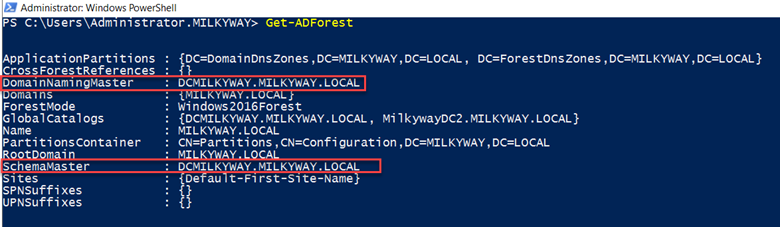
To review the DCs that currently hold the forest-wide roles, use the cmdlet shown below.Get-ADForest
Transferring the Roles
You can transfer just one of the roles or both roles at once. You will be prompted to confirm the transfers.
Schema Master
To transfer the Schema Master role, use either of the following commands:Move-ADDirectoryServerOperationMasterRole -Identity “MilkywayDC2” -OperationMasterRole SchemaMasterMove-ADDirectoryServerOperationMasterRole -Identity “MilkywayDC2” -OperationMasterRole 3
Domain Naming Master
To transfer the Domain Naming Master role to another DC, use either of the following commands:Move-ADDirectoryServerOperationMasterRole -Identity “MilkywayDC3” -OperationMasterRole DomainNamingMasterMove-ADDirectoryServerOperationMasterRole -Identity “MilkywayDC3” -OperationMasterRole 4
Both forest-wide roles at once
To transfer both forest-wide roles at once, use either of the commands shown below. If you want to transfer each role to a different DC, specify the DC name using the -Identity parameter.
To confirm the role transfers, you can either enter A to confirm all of them at once, or enter Y for each transfer separately.Move-ADDirectoryServerOperationMasterRole -Identity “MilkywayDC2” -OperationMasterRole SchemaMaster,DomainNamingMaster

Move-ADDirectoryServerOperationMasterRole -Identity “MilkywayDC2” -OperationMasterRole 3,4

Transferring All the FSMO Roles using a Single PowerShell Cmdlet
If you have just one domain with only 2 or 3 DCs and you want to transfer all 5 of the FSMO roles, you can use either of the cmdlets shown below.Move-ADDirectoryServerOperationMasterRole -Identity “MilkywayDC2” -OperationMasterRole PDCEmulator,RIDMaster,InfrastructureMaster,SchemaMaster,DomainNamingMaster

Move-ADDirectoryServerOperationMasterRole -Identity “MilkywayDC2” -OperationMasterRole 0,1,2,3,4

How to Transfer FSMO Roles using ntdsutil.exe
A third way to transfer FSMO roles is to use the command-line program ntdsutil.exe. Note that only experienced administrators should use this powerful tool.
Here are the steps to take:
1. Log in to either a member computer where AD RSAT tools are installed or a DC located in the same forest where the Operation Master roles exist. It is recommended that you log on to the DC to which you are transferring Operation Master roles.
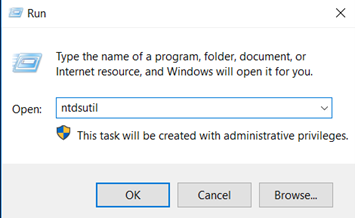
2. Click Start and type Run. In the Run dialog box, type ntdsutil and click OK.
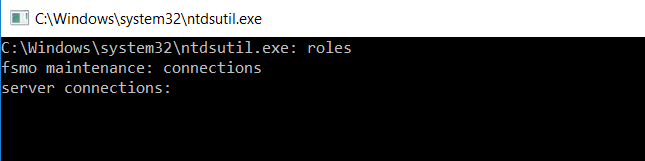
3. At the ntdsutil prompt, type roles and press Enter.
4. At the fsmo maintenance prompt, type connections and press Enter.
5. Type the command below, replacing milkywayDC2.milkyway.local with the name of the DC you want to transfer the roles to, and press Enter.connect to server milkywayDC2.milkyway.local
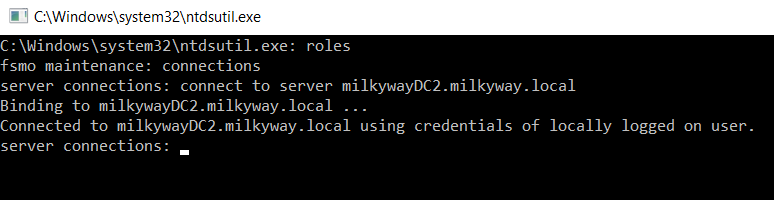
6. At the server connections prompt, type q and press Enter.
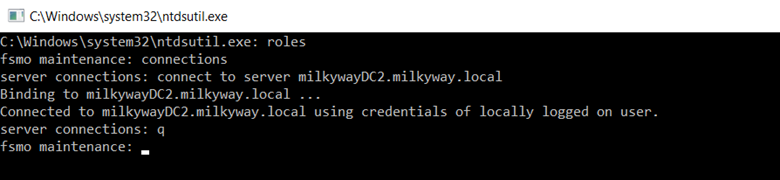
7. This will bring you back to the fsmo maintenance prompt. To see the list of roles that you can transfer and their commands, type ? and press Enter.
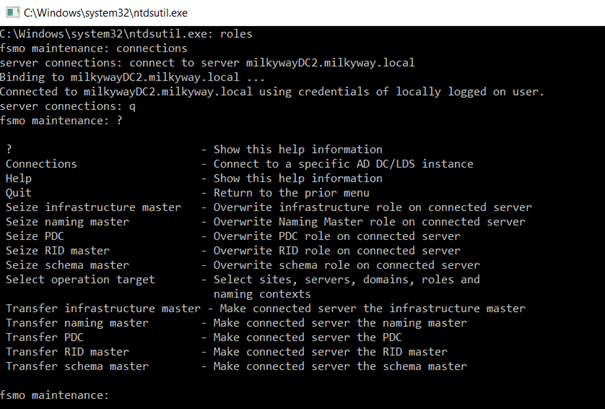
8. To transfer a role, type the corresponding command from the list below and press Enter.Transfer domain naming master Transfer infrastructure master Transfer PDC Transfer RID master Transfer schema master
9. When a warning message appears, click Yes to confirm the transfer.
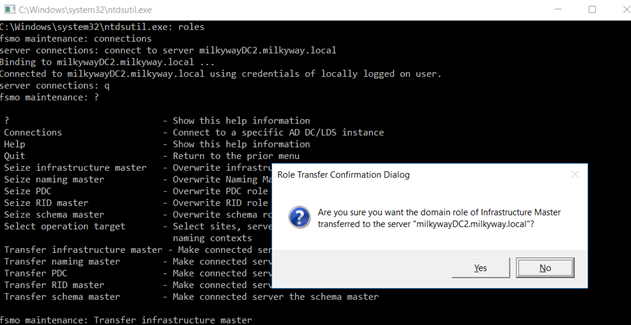
10. At the fsmo maintenance prompt, type q and press Enter to get back to the ntdsutil prompt.
11. To quit the Ntdsutil utility, type q and press Enter.