SQL installation in the Cluster node failed with an error

The cluster resource ‘SQL Server’ could not be brought online due to an error bringing the dependency resource ‘SQL Network Name’ online : Access is denied

When the SQL Server Network Name is first brought online during the FCI installation process, the CNO identity is used to create the VCO(as long as the VCO doesn’t already exist). If the required permissions are not granted to the CNO, the creation of the VCO will fail and so will your SQL Server FCI installation.

We must grant the permissions “Read all properties” and “Create Computer objects” to the CNO via the container. Here’s an example of granting the required permissions for demonstration purposes:

1. Open the Active Directory Users and Computers Snap-in (dsa.msc).

2. Locate “Computers” container:

thumbnail image 4 of blog post titled 


							Error during installation of an SQL server Failover Cluster Instance

3. Make sure “Advanced Features” is selected:

thumbnail image 5 of blog post titled 


							Error during installation of an SQL server Failover Cluster Instance

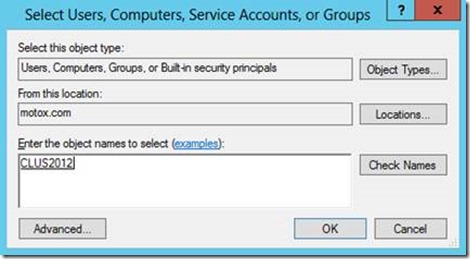
4. Open the properties of the container and click the “Security” tab. Click “Add” and add the CNO. Make sure to select “Computers” option in the “Object Types” window:

thumbnail image 6 of blog post titled 


							Error during installation of an SQL server Failover Cluster Instance
thumbnail image 7 of blog post titled 


							Error during installation of an SQL server Failover Cluster Instance

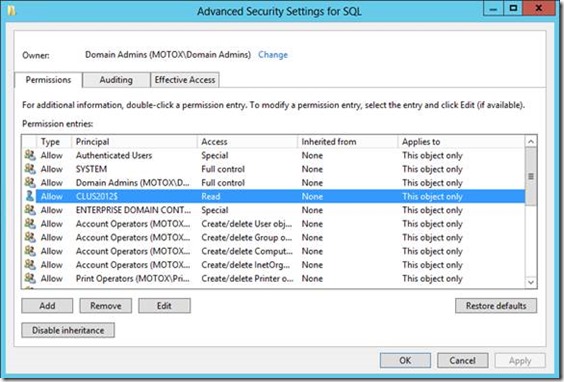
5. Click “Advanced”, highlight the CNO, and click “Edit”:
thumbnail image 8 of blog post titled 


							Error during installation of an SQL server Failover Cluster Instance

6. Make sure “Read all properties” and “Create Computer objects” are checked. Click OK until you’re back to the AD Users and Computer window:

thumbnail image 9 of blog post titled 


							Error during installation of an SQL server Failover Cluster Instance

7. Retry your previously failed installation. 

https://blog.sqlauthority.com/2017/09/18/sql-server-cluster-resource-sql-server-not-brought-online-due-error-bringing-dependency-resource

https://techcommunity.microsoft.com/t5/sql-server-support-blog/error-during-installation-of-an-sql-server-failover-cluster/ba-p/317873

Leave a Comment