
The Problem
I run a WireGuard VPN server on a Google Cloud VM. It had been working well: clients connected, and I could reach every other VM in the VPC through the tunnel.
Then I installed Docker on the same server, and VPN clients could no longer reach the other GCP VMs. Nothing else had changed. The tunnel still connected, and the server was still reachable over its VPN address, but anything routed through it into the VPC went nowhere.
Why Docker Breaks This
When Docker installs, it changes the host’s firewall:
- It sets the default policy of the iptables
FORWARDchain to DROP. - It inserts its own chains (
DOCKER-USER,DOCKER-FORWARD) at the top ofFORWARD. - It only accepts forwarded traffic that belongs to its own bridge networks (like
docker0).
A WireGuard server that routes client traffic into the VPC relies on FORWARD to pass packets between wg0 and the main network interface. With Docker’s DROP policy, any traffic without an explicit accept rule is silently discarded.
Diagnosing It
Check the FORWARD chain and the NAT rules on the server:
sudo iptables -S FORWARD
sudo iptables -t nat -S POSTROUTING
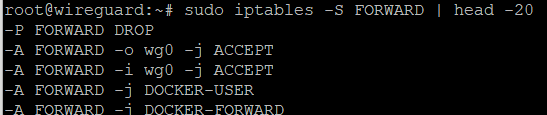
This is what the FORWARD chain looked like on my server:

-i wg0 -j ACCEPT.And the NAT table:

enp0s0 is present and fine.The NAT rule is not the problem. The problem is in FORWARD, which has only one accept rule:
-A FORWARD -i wg0 -j ACCEPTThat allows traffic coming in from wg0 (client to VPC), but nothing allows traffic going out to wg0. Here is what happens to a ping:
- The client’s ping enters
wg0and passes the-i wg0accept rule. - The server masquerades it out the main interface to the target VM.
- The target VM replies.
- The reply arrives on the main interface and must be forwarded back into
wg0. - No rule matches, so the
DROPpolicy kills it.
The client sees a timeout, even though the request reached its destination.
The Fix
Add an accept rule for traffic leaving through wg0, placed at the top of the chain so it is evaluated before Docker’s rules:
sudo iptables -I FORWARD 1 -o wg0 -j ACCEPTFor a tighter version that only allows replies to connections the client started:
sudo iptables -I FORWARD 1 -o wg0 -m conntrack --ctstate RELATED,ESTABLISHED -j ACCEPTI also added a masquerade rule scoped to the VPN subnet:
sudo iptables -t nat -A POSTROUTING -s 172.16.20.0/24 -o enp0s0 -j MASQUERADEAfter the change, the FORWARD chain now has the missing -o wg0 rule at the very top:
wg0 sit above Docker’s chains.And the NAT table with the new scoped masquerade rule:

172.16.20.0/24).Pings to the other VMs started working immediately.
Optional cleanup: the older rule -A POSTROUTING -o enp0s0 -j MASQUERADE has no source match, so it masquerades everything leaving that interface, including host and Docker traffic. Once the scoped rule is in place you can remove it:
sudo iptables -t nat -D POSTROUTING -o enp0s0 -j MASQUERADEMaking It Permanent
Rules added by hand disappear on reboot, so put them in the [Interface] section of /etc/wireguard/wg0.conf. Replace enp0s0 with your own interface name (check with ip -br a) and the subnet with your WireGuard range:
PostUp   = iptables -I FORWARD 1 -i wg0 -j ACCEPT; iptables -I FORWARD 1 -o wg0 -j ACCEPT; iptables -t nat -A POSTROUTING -s 172.16.20.0/24 -o enp0s0 -j MASQUERADE
PostDown = iptables -D FORWARD -i wg0 -j ACCEPT; iptables -D FORWARD -o wg0 -j ACCEPT; iptables -t nat -D POSTROUTING -s 172.16.20.0/24 -o enp0s0 -j MASQUERADE
Using -I FORWARD 1 inserts the rules at the very top, ahead of Docker’s chains. Restart WireGuard to apply:
sudo wg-quick down wg0 && sudo wg-quick up wg0One Caveat: Restart Order
Docker rewrites its own chains whenever it restarts. If Docker starts after WireGuard, your rules could end up below Docker’s. If traffic stops after a reboot or a Docker restart, re-run wg-quick down wg0 && wg-quick up wg0 to reinsert them at the top. You can also order the services with a systemd override so wg-quick@wg0 starts after docker.service.
Other GCP Checks
If forwarding is fixed and pings still fail, check the GCP side:
- Firewall on the target VMs: they must allow ingress (ICMP, SSH, or whatever ports you need) from the WireGuard server’s internal IP. This is the source address the targets see when you masquerade.
- IP forwarding on the VM: the WireGuard instance needs “IP forwarding” enabled, which is set at creation time.
- Kernel forwarding: confirm
sysctl net.ipv4.ip_forwardreturns1. - Client
AllowedIPs: it must include your VPC subnet (for example10.128.0.0/20), or the traffic never enters the tunnel.
Quick Debugging Trick
If it still fails, capture on both interfaces while pinging a VM:
sudo tcpdump -ni wg0 icmp
sudo tcpdump -ni enp0s0 icmp- Seen on
wg0but not on the main interface: forwarding is blocked. - Leaves the main interface but no reply: GCP firewall on the target.
- Reply arrives on the main interface but not
wg0: the missing-o wg0rule from this post.
Summary
Installing Docker on a WireGuard host changes the FORWARD policy to DROP. If your rules only accept traffic entering wg0, replies coming back from the VPC are dropped. Add an accept rule for -o wg0 at the top of the chain, put it in PostUp, and make sure it stays above Docker’s rules.