
If your Windows Server 2019 RDS hosts suddenly experience broken Start Menus, unresponsive modern apps, or AppX registration failures, the root cause may be something that usually goes unnoticed: notification registry bloat.
This issue is especially common on heavily used RDS servers where many users log in and out daily. Over time, Windows accumulates thousands of stale notification entries in the registry, causing the Start Menu and AppX subsystem to slow down, time out, or fail entirely.
What Is Notification Registry Bloat?
Windows stores push notification metadata, tile data, and Windows Notification Facility (WNF) entries under:
HKEY_LOCAL_MACHINE\SOFTWARE\Microsoft\Windows NT\CurrentVersion\Notifications
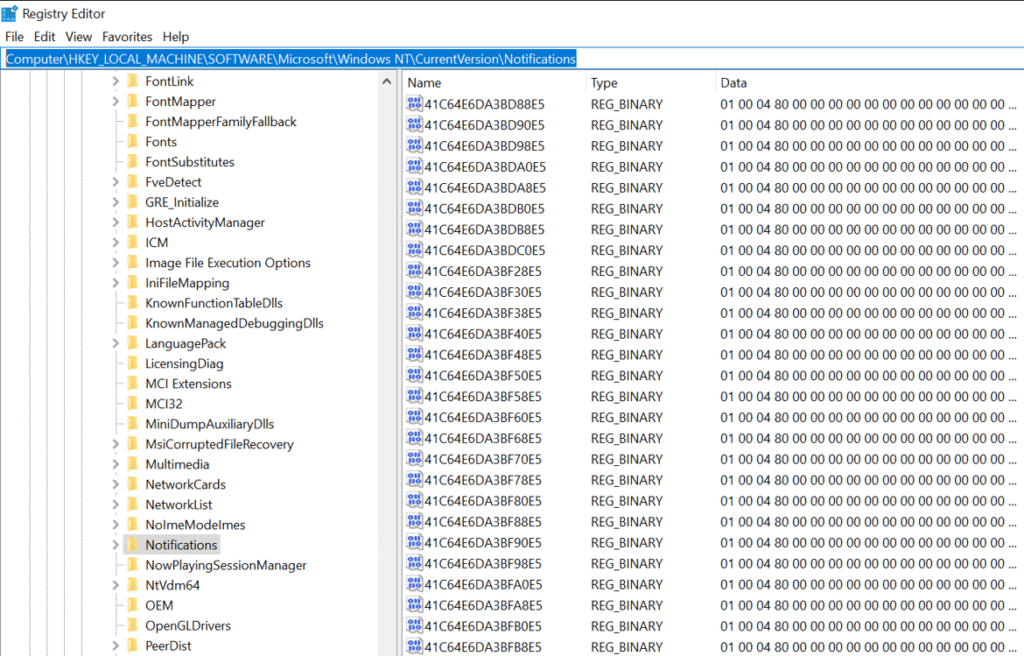
In normal conditions, this key contains a manageable number of entries.
But on RDS servers, this key often grows to thousands of REG_BINARY values — far more than the Shell and AppX components can efficiently process.
How Does This Break Start Menu and AppX?
As the Notifications registry key becomes overloaded, several Windows components begin to fail:
1. ShellExperienceHost and StartMenuExperienceHost Time Out
Both services read notification data at logon.
A bloated registry causes delays or failures, leading to:
- Start Menu not opening
- Taskbar icons freezing
- Search not responding
- Blank or partially loaded shells
2. AppX Initialization Fails
The AppX subsystem also relies on notification state. When registry entries are excessive:
- AppX registration fails
- Modern apps refuse to start
- Event Viewer shows AppXDeployment-Server errors
- DCOM errors referencing ShellExperienceHost appear
This is why re-registering AppX packages with PowerShell often does not fix the issue — the underlying registry bottleneck remains.
Why Windows Server 2019 RDS Is Affected More
RDS hosts accumulate notification entries much faster because:
- Many users log in/out daily
- Sessions generate notification objects
- Windows rarely cleans up old entries
- Servers remain online for months at a time
Over time, this leads to a massive buildup of stale notification values that choke the Start Menu and AppX services.
How to Fix the Issue
You should not manually delete registry entries.
The safe and proven solution is to use a cleanup tool designed for this issue:
✔ clnotifications (GitHub)(Download)
This tool safely removes old/stale notification entries while keeping a core set of required values. It preserves stability and reduces bloat, restoring normal Start Menu and AppX behavior.
What the tool does:
- Scans the Notifications registry key
- Keeps the first ~500 valid entries
- Removes stale/broken entries
- Creates a cleanup log for auditing
Important: Always back up the key first:
reg export "HKLM\SOFTWARE\Microsoft\Windows NT\CurrentVersion\Notifications" C:\temp\Notifications-backup.reg
After cleanup, most admins report:
- Start Menu opens instantly
- AppX apps launch again
- User logons become much faster
- ShellExperienceHost errors disappear
Why This Fix Works
Cleaning the Notifications registry reduces the amount of data the shell and AppX stack must parse at logon. This eliminates timeouts and failures caused by registry overload.
In short: the Start Menu wasn’t corrupt — it was overloaded.
Conclusion
Notification registry bloat is a hidden but increasingly common cause of Start Menu and AppX failures on Windows Server 2019 RDS systems. If your RDS hosts show these symptoms, checking this registry key should be one of the first steps.
Using a cleanup tool like clnotifications provides a safe, repeatable, and effective fix that restores stability and performance without needing OS reinstallations or complex AppX repairs.
Sources:
https://github.com/Lazy-256/clnotifications
http://www.joelleach.net/2024/12/30/windows-server-appx-installation-failures/