
Do a sniffer to the NPS/Radius server from the FortiGate Firewall to find the error.
diagnose sniffer packet any 'host x.x.x.x and port yyyy' 4If you find the below error.
2    0.001287    10.10.10.10    10.10.10.254    RADIUS    84
    Access-Reject(3) (id=5, l=42)
AVP: l=22  t=Vendor-Specific(26) v=Microsoft(311)
VSA: l=16 t=MS-CHAP-Error(2): \000E=691 R=0 V=3
Then apply the solution below on the NPS Radius server.
Windows server might refuse NTLM connections because NTLMv1 is disabled by default.
Enable NTLMv1 in the server as follows:
Start > Administrative Tools > Local Security Policy > Local Policies > Security Options > Network security: LAN Manager authentication level entry > Send NTLM response only.
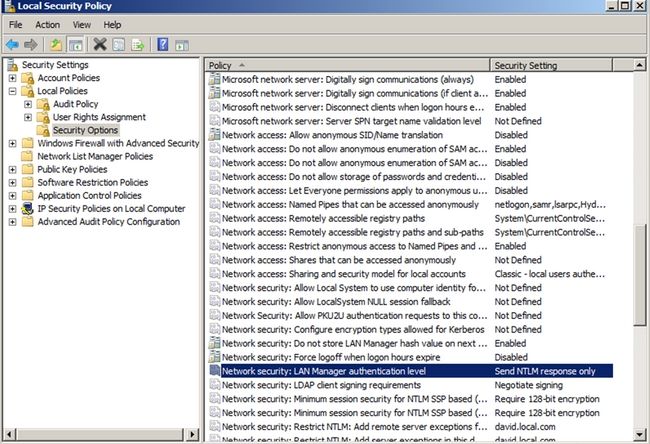
*This solution was tested in 2012 R2, 2016, and 2019.
Source: